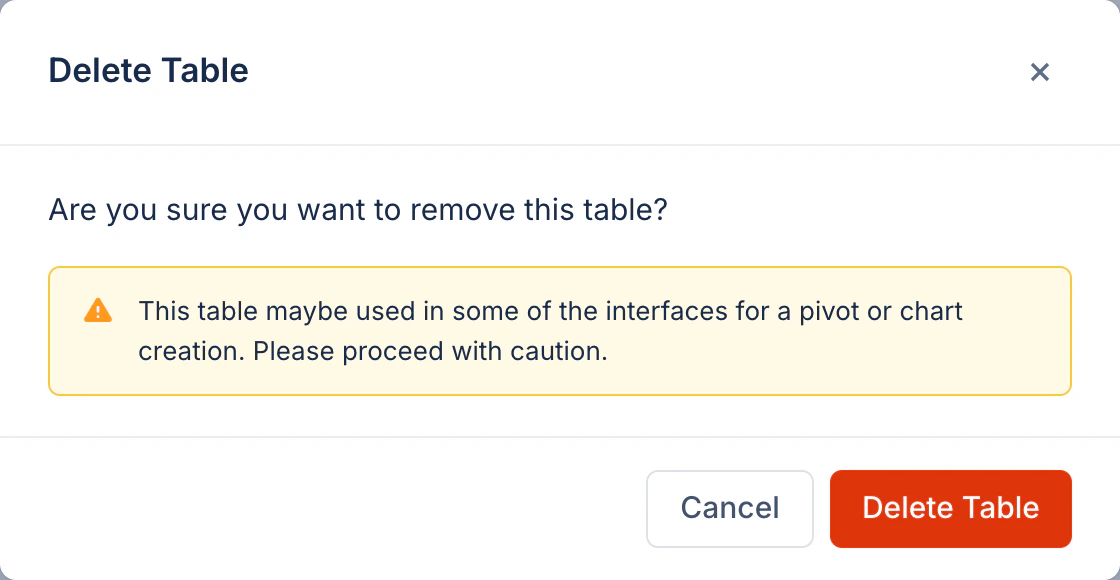
Before: Original dialog
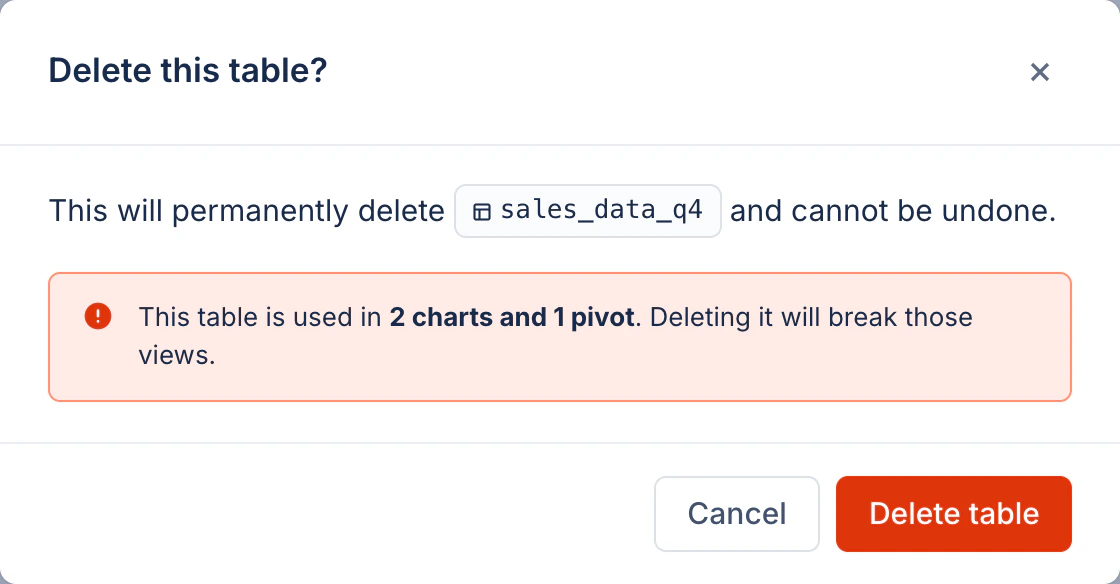
After: Revised dialog
Process
AI-assisted workflow
This rewrite was generated using an AI-assisted workflow. I first prompted an AI model to evaluate the original copy against the Atlassian content design guidelines, which served as the baseline standard for voice, tone, and terminology.After generating the initial critique and suggestions, I manually reviewed and refined the recommendations to ensure they were contextually accurate, clear, and perfectly aligned with the intended user experience before arriving at the final output.
What changed and why
1
Title: verb-led question, sentence case
“Delete Table” uses title case and reads as a noun phrase. “Delete this table?” leads with the verb and frames the dialog as a confirmation question, consistent with Atlassian’s modal title pattern. “table” is lowercase because it refers to the object, not a proper name.
2
Body: state the consequence, not just the action
“Are you sure you want to remove this table?” states the action but gives no consequence. The revised copy explicitly names the result (“permanently delete… cannot be undone”) and anchors it to a specific object via an inline chip, removing all ambiguity about what will be lost.
3
Warning: be specific about impact
“This table maybe used in some of the interfaces for a pivot or chart creation” is vague, contains a grammar error (“maybe” should be “may be”), and ends with the hedge “Please proceed with caution.” Atlassian guidelines require warning messages to state the actual downstream impact. The revised message names it precisely: 2 charts and 1 pivot.
4
Warning severity: use the correct color role
A yellow triangle signals a recoverable caution state. Deleting a table that breaks downstream views is irreversible, which is a danger-level action. Atlassian reserves red for situations involving data loss or broken functionality. The revised dialog uses the danger appearance for the inline message.
5
Button label: sentence case, mirrors dialog verb
“Delete Table” (title case) becomes “Delete table” (sentence case). Atlassian’s writing guidelines require sentence case for all UI controls. The button copy also mirrors the title verb so the user sees consistent language from heading to action.
6
Remove 'please' and hedging language
“Please proceed with caution” adds no information and softens a message that should be direct. Atlassian voice is honest and clear. If something is at risk, name what is at risk; do not pad with polite disclaimers.