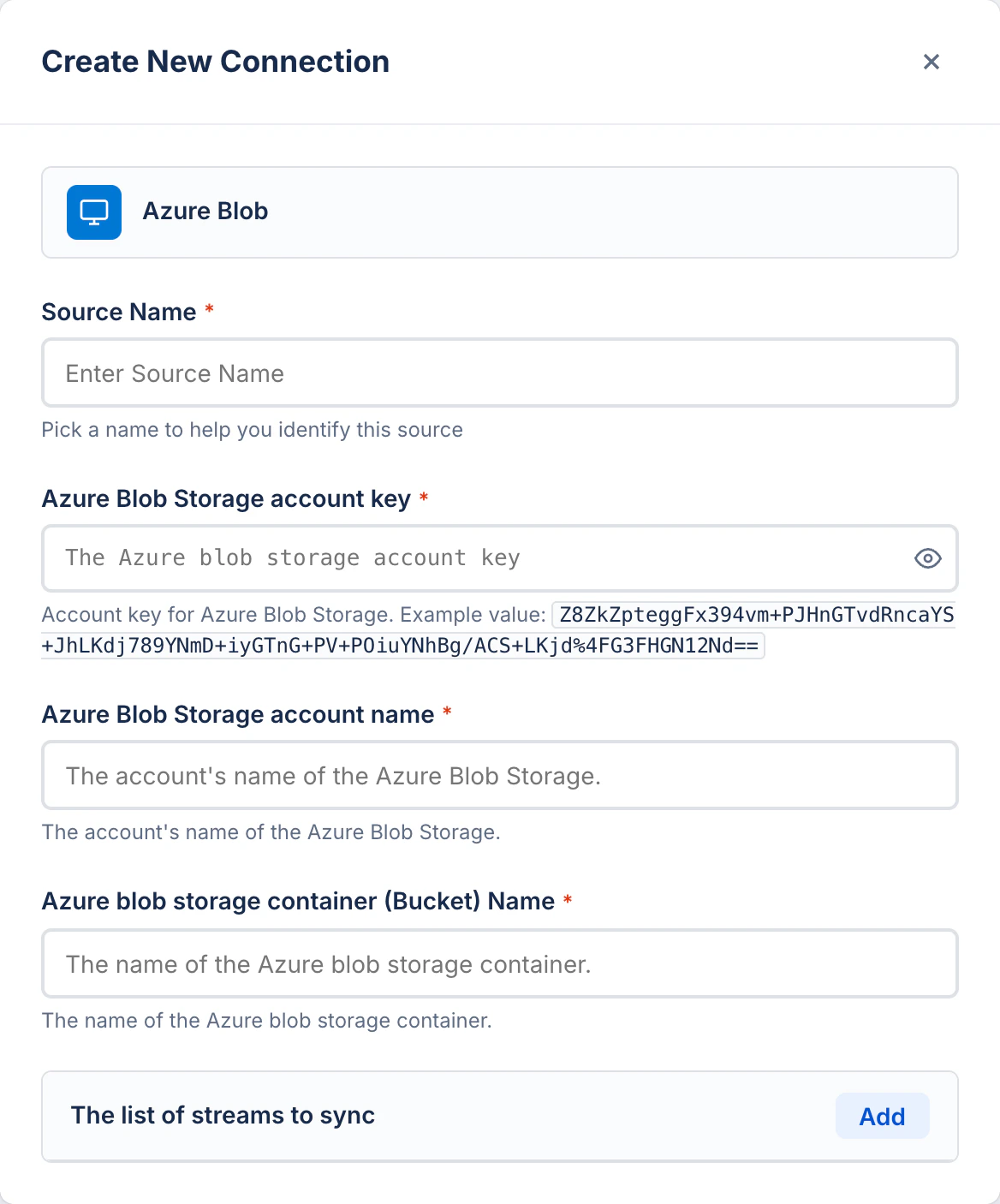
Before: Original form
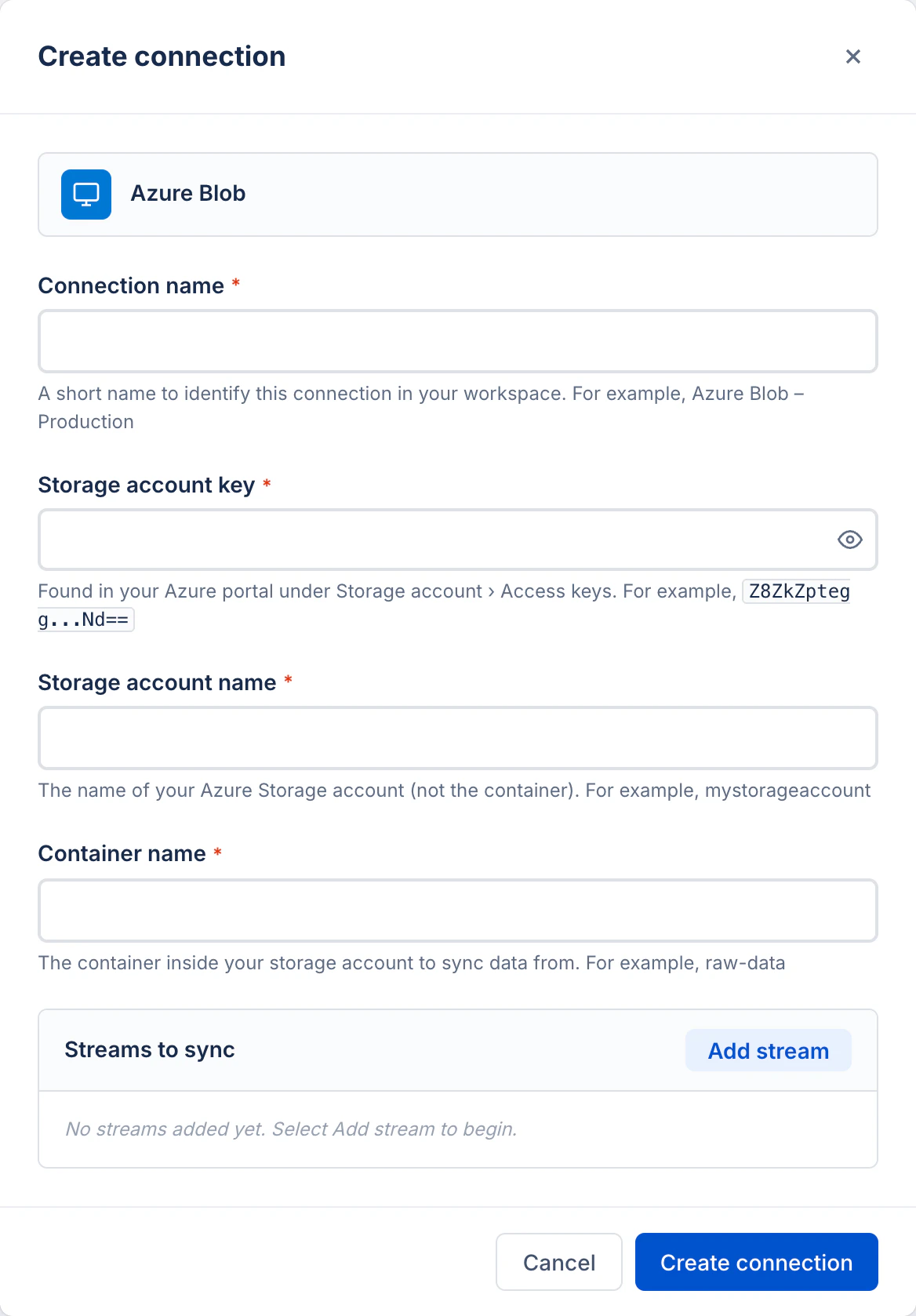
After: Revised form
Process
AI-assisted workflow
This rewrite was generated using an AI-assisted workflow. I first prompted an AI model to evaluate the original copy against the Atlassian content design guidelines, which served as the baseline standard for voice, tone, and terminology.After generating the initial critique and suggestions, I manually reviewed and refined the recommendations to ensure they were contextually accurate, clear, and perfectly aligned with the intended user experience before arriving at the final output.
What changed and why
1
Page title: sentence case, drop 'New'
“Create New Connection” uses title case and an unnecessary qualifier. Atlassian guidelines require sentence case for all headings and UI titles. “New” is also redundant; creating a connection is inherently new.Revised: “Create connection”
2
Field label: 'Source Name' → 'Connection name'
The product context is creating a connection, not a source. “Source Name” is an internal data model term leaking into the UI. “Connection name” matches the user’s mental model and the form’s own title. Label is also lowercase (“name”) per sentence case rules.
3
Placeholder text: Atlassian advises against it
Placeholders disappear once users start typing, making them unreliable for conveying important information. Atlassian guidelines state: avoid placeholder text whenever possible. Critical information must live in the field label or helper text.In the revised form, all placeholders are removed and example values are moved into helper text below each field.
4
Helper text: remove copy-paste duplication
The original helper text for the account name and container name fields is identical to the placeholder: “The account’s name of the Azure Blob Storage.” This adds no value. Atlassian guidelines say helper text should provide additional context the label doesn’t cover. Each revised hint is distinct and actionable.
5
Field labels: remove redundant product prefix
“Azure Blob Storage account key”, “Azure Blob Storage account name”, and “Azure blob storage container (Bucket) Name” all carry the full product name as prefix. Inside a form already scoped to Azure Blob, this is noise.Revised: “Storage account key”, “Storage account name”, “Container name” (shorter, scannable, unambiguous in context).
6
Remove '(Bucket)' parenthetical
“Azure blob storage container (Bucket) Name” appends an S3 concept in parentheses to avoid confusion. This is a documentation workaround in the UI. The revised label “Container name” is the correct Azure term. The helper text clarifies scope: “The container inside your storage account to sync data from.”
7
Account key hint: add where to find it
The original hint pastes a long raw example key with no context for where to find it. Atlassian guidelines say helper text should help users complete the task. The revised hint tells users exactly where to locate the value (Azure portal › Storage account › Access keys) and keeps the example truncated for readability.
8
Streams section: 'The list of streams to sync' → 'Streams to sync'
“The list of” is a verbose article phrase that adds no meaning. The section label should name the content, not describe its data structure. Button label “Add” is also too generic; “Add stream” is more specific and matches the label’s noun.
9
Empty state: add guidance text
The original streams panel has no empty state message, leaving a blank box with no affordance. Atlassian guidelines call for empty states to explain what will appear and how to proceed.Added: “No streams added yet. Select Add stream to begin.”
10
Add form footer with actions
The original form has no visible submit or cancel button in the panel, which is a significant usability gap. The revised form includes a footer with “Cancel” and “Create connection” (matching the title verb) so users always know how to commit or exit.