> ## Documentation Index
> Fetch the complete documentation index at: https://portfolio.subinb.com/llms.txt
> Use this file to discover all available pages before exploring further.
# Delete prescription
> Deletes existing prescription.
## OpenAPI
````yaml DELETE /prescriptions/{prescriptionId}
openapi: 3.0.0
info:
title: Subin Health API
description: >
# Overview
Subin Health API lets you manage patient data, prescriptions, and inventory.
You can view, edit, delete patient profiles, history, visits, and medical
records. You can also track the medicine inventory based on new
prescriptions.
This API is REST-based and is documented in OpenAPI
format.
Base URL for all requests:
`https://virtserver.swaggerhub.com/SUBIN23K/Subin_Health/1.0.0`.
# Authentication
Subin Health API uses API Key authentication. Click `Authorize` and enter a
string to generate a new API key.
# Use Case
## Prescription and Invoicing
You can use Subin Health API to generate prescription after a doctor's
consultation and invoice for payment. The endpoints related to inventory
check the real-time availability of medicines in your inventory. With the
help of historic data from prescriptions, you can proactively restock
medicines that are in demand.
The following diagram outlines the
process flow:
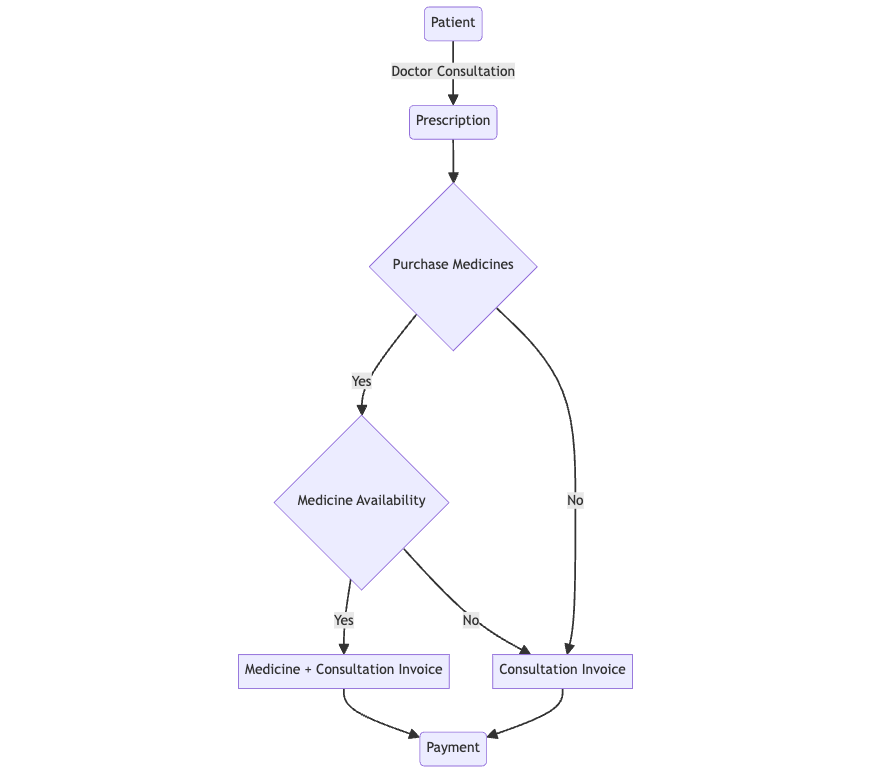
When the flow is complete, the system automatically
updates the patient's history.
version: 1.0.0
servers:
- url: https://virtserver.swaggerhub.com/SUBIN23K/Subin_Health/1.0.0
description: Subin Health API
security:
- api_key: []
tags:
- name: Patient
description: Manage patient data
- name: History
description: Manage patient's history
- name: Prescriptions
description: Manage prescriptions
- name: Inventory
description: Manage inventory
- name: Invoice
description: Manage invoices
paths:
/prescriptions/{prescriptionId}:
delete:
tags:
- Prescriptions
summary: Delete prescription
description: Deletes existing prescription.
operationId: deletePrescription
parameters:
- name: prescriptionId
in: path
description: Prescription ID
required: true
style: simple
explode: false
schema:
type: integer
format: int64
example: 123124
responses:
'200':
description: Successful operation
'400':
description: Invalid prescription ID
'404':
description: Prescription not found
components:
securitySchemes:
api_key:
type: apiKey
name: api_key
in: header
````